Trades
Route: /trades. Start with proposals that need approval, then discover or build a trade.
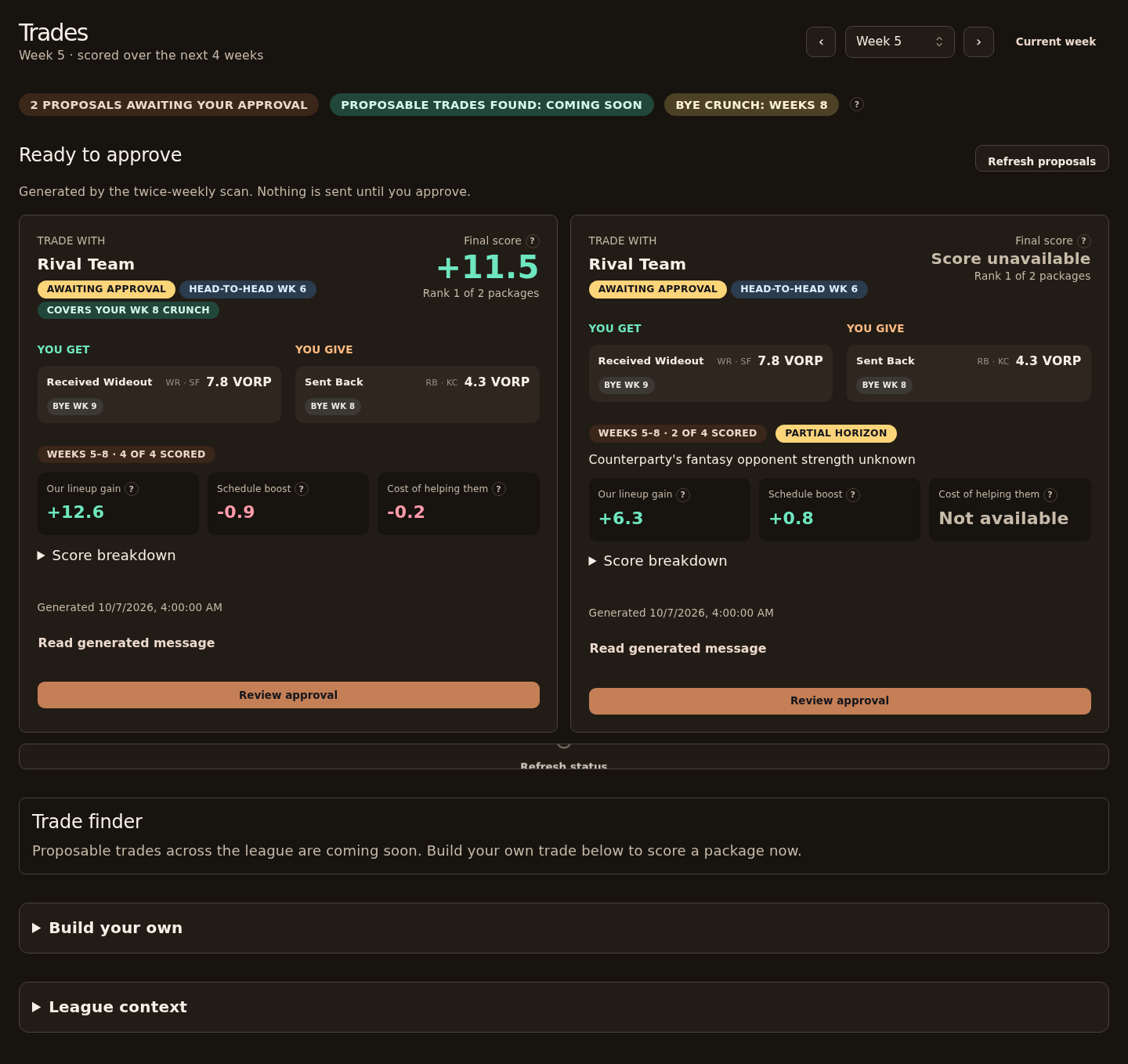
What does it show?
| Panel | Shows |
|---|---|
| Ready to approve | Proposals awaiting your approval: counterparty, players sent and received, pitch, score evidence. Each trade scan (Wednesday and Friday) can stage up to three alternatives, one per team, best first. |
| League context (collapsed) | Team needs, schedule, each player's NFL bye and the counterparty's bye-crunch weeks, and provenance, for a chosen horizon and counterparty |
| Build your own (collapsed) | Pick players, choose a trading team and horizon, score the trade live, or compare single-week VORP |
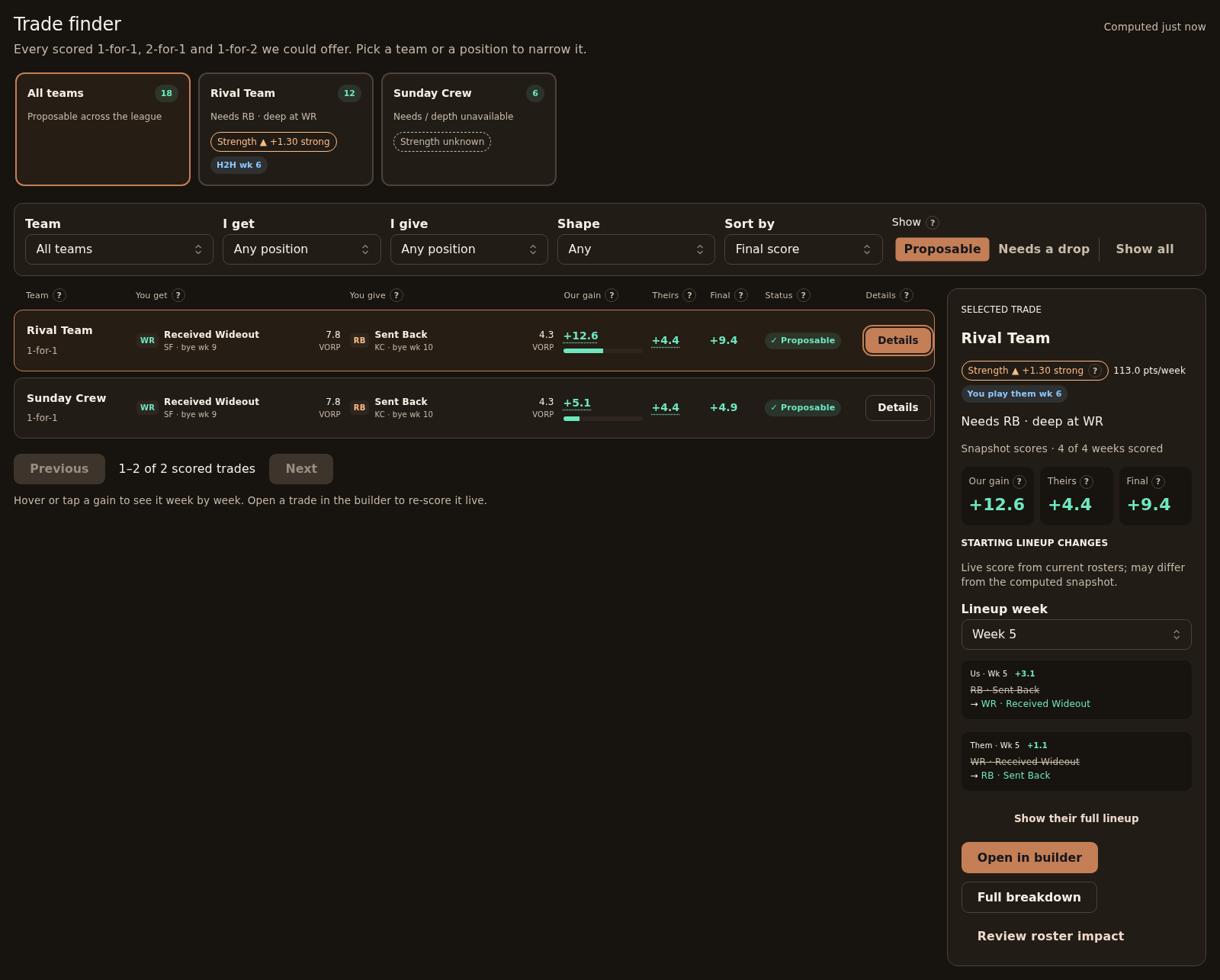
| Trade finder | Precomputed candidate trades, team counts, filters, weekly gain evidence and current lineup impact |
The header summarizes proposals awaiting approval, proposable candidates across the whole run and upcoming bye-crunch weeks. Look for a trade in a bye-crunch banner opens /trades#finder.
Proposal cards show You get and You give, with position, VORP and NFL bye when those players can be matched to the current league roster. Unmatched players retain their names or ESPN IDs. A notification's ?offer= link highlights its proposal.
Browse trade candidates
Use the team cards or Team filter to choose an opponent. Cards show each team's proposable count, roster needs and depth, strength and head-to-head weeks. Counts cover the whole computed run, independently of your filters. Narrow I get, I give, Shape, Status or Sort by to browse every matching candidate. Shapes are from your side: 2-for-1 means you give two and receive one. Proposable is the default; Needs a drop shows packages that exceed a roster limit, and Show all includes one-sided packages with reasons.
The computed timestamp identifies the snapshot. A warning appears after 36 hours. If the computation has not run for the selected week, the finder explains that; a completed run with no matches shows a separate empty state.
Hover, focus or tap Our gain or Theirs for a live week-by-week lineup breakdown. Details opens the team's starting lineup changes, a week selector and an optional full lineup. These reads use current rosters and can differ from the snapshot scores. Full breakdown shows the returned live scoring evidence.
Open in builder expands Build your own, prefills the exact players and opponent, selects the candidate's horizon and scores the package live. Review roster impact opens the move review page with those players. Neither action submits an offer.
Review the outgoing message
Messages start collapsed. Open Read generated message, then Edit message to change the outgoing text. Save message accepts nonblank text up to 1000 characters; Cancel discards your unsaved changes. A saved local edit shows Edited by you, and Reset to generated draft restores the original before approval. Edited text is sent exactly as written and is not checked against the score. The generated draft stays with the offer.
The review dialog displays the final message, players and live score when a supported score request is available. Legacy proposals explicitly state when live scoring is unavailable. Check the acknowledgment, enter an approver name, then select Approve and queue offer. Queueing fixes the offer's terms; its returned offer key follows the edited message. If an already-saved edit returns for a retry after publication failure, its message is read-only because it cannot be edited a second time.
Reading the score and strength
Proposals show Our lineup gain, Schedule boost and Cost of helping them as separate signed values. Their lineup gain contributes a penalty to our score, weighted fully in head-to-head weeks and lightly otherwise. Based on the rounded displayed value, teal values are above +0.05, pink values below −0.05, and values inside that dead band use secondary text. Unavailable data stays unavailable. Open Score breakdown for the returned score terms and weekly evidence. Card scores are stored evidence from generation; reviewing a supported proposal requests a fresh live score.
The round ? buttons explain the numbers on hover, keyboard focus or tap. Press Escape or tap again to dismiss an explanation.
Strength compares completed fantasy points per week with the league average and displays two decimals. The displayed value determines the label: at least +0.50 is strong, at most −0.50 is weak, and other observed values are average. Based on the rounded displayed value, orange means above +0.05, blue means below −0.05, and values inside that dead band use secondary text. Missing strength uses a dashed unknown chip. Strength is neither win probability nor NFL defense difficulty.
In Build your own, a scored result shows a verdict and four tiles: our lineup gain, schedule boost, their lineup change and the cost of helping them. The weekly table puts the opponent strength, players entering and leaving each starting lineup, multiplier and weighted gain together. Unscored weeks retain their reasons. Changing the inputs hides the old result until you score again. Propose this trade (coming soon) is disabled; scoring your own package does not send a trade.
Which endpoints does it call?
| Endpoint | Purpose |
|---|---|
GET /v1/trade/offers | Outgoing proposals |
POST /v1/trade/offers/<key>/approve | Approve a proposal |
GET /v1/roster/bye-outlook | Upcoming bye-crunch summary |
GET /v1/trade/candidates | Filtered and paginated candidate trades and team counts |
GET /v1/roster/deficits | Opponent roster needs and depth |
GET /v1/trade/context | League context (collapsed) |
POST /v1/trade/score | Score and reasons for a proposal |
POST /v1/trade/evaluate | Manual evaluator |
GET /v1/league/teams | Team names |
GET /v1/players/search | Player picker |
What actions can it take?
| Action | Confirmation | Effect |
|---|---|---|
| Evaluate | None | Read-only comparison |
| Review approval | Dialog with exact players, score, final message, approver name and checkbox | Queues the offer; the worker may propose a real trade to that manager in ESPN |
| Refresh status | None | Re-reads proposal status |
Approval is not an ESPN confirmation. If the outcome is unknown, don't approve again until you refresh status.
Reviewing approved offers
Open Sent trades in the Trades header (/trades/sent) to review approved offers. Filter by outcome, then select an offer to see its players, message, score and timeline. On a phone, the list appears above the detail. Edited messages retain the editor's label and a toggle for the original generated draft when one was recorded.
Queued approval is separate from confirmed ESPN submission. Submitted offers stay Waiting while the API does not record the other manager's answer. View on ESPN opens the league's transactions view; a direct offer link is not available yet. Withdrawal is shown disabled for submitted waiting offers.
Opening a pending offer requests POST /v1/trade/score for the same player sides and current league week, using the stored horizon when available. Finished offers retain the stored score. The score tiles label stored scan evidence explicitly: the API does not yet expose an approval-time re-score. Cost of helping them shows the signed schedule-weighted penalty. Unavailable evidence and uncertain sends are labeled rather than treated as zero or a confirmed failure. Use Refresh offers to re-read status and scores.